SCIM 2.0 API Integration Guide
This document describes how to integrate with the SCIM 2.0 API implementation of the sv-oidc service. The API follows the RFC 7643 and RFC 7644 specification.
Prerequisites
Before interacting with the API, ensure you have:
Authentication
The API uses Bearer Token authentication. You must include your API key in the Authorization header of every request.
Authorization: Bearer <YOUR_API_KEY>
Base URL
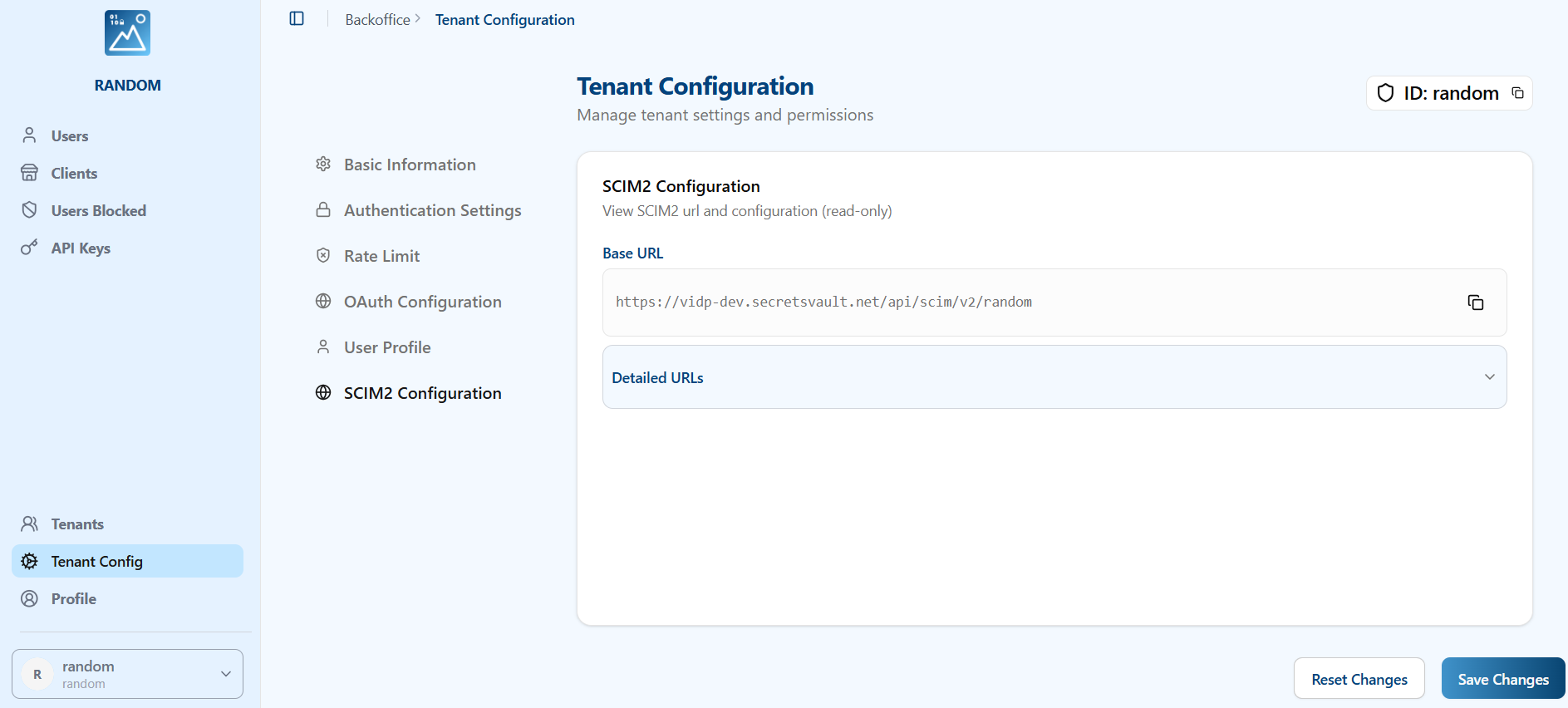
All SCIM 2.0 endpoints are prefixed with the following base URL:
https://<your-domain>/scim/v2/{tenant_id}
Replace {tenant_id} with your specific tenant ID. You can get the url from the SCIM2 config section in the tenant
Rate Limiting
The API enforces rate limiting to ensure stability.
- Limit: 200 requests per minute.
- If the limit is exceeded, the server will return a
429 Too Many Requestserror.
Supported Resources
1. Service Discovery
These endpoints allow clients to discover the SCIM specification features supported by the service.
- Get Service Provider Config:
GET /ServiceProviderConfig- Returns compliance details, authentication schemes, and supported data models.
- Bulk Operations: NOT supported.
- Sorting: NOT supported.
- ETags: NOT supported.
- Change Password: NOT supported.
- Get Resource Types:
GET /ResourceTypes- Lists available resource types (e.g., User, Group).
- Get Schemas:
GET /Schemas- Retrieves definitions of the resource schemas.
2. Users
Manage user identities.
Endpoint: /Users
Supported Operations
| Method | Endpoint | Description |
|---|---|---|
POST | /Users | Create a new user. |
GET | /Users/{id} | Retrieve a user by ID. |
GET | /Users | List users with pagination. |
PUT | /Users/{id} | Replace a user resource (Full update). |
PATCH | /Users/{id} | Update specific user attributes (Partial update). |
DELETE | /Users/{id} | Delete a user. |
Attribute Filtering
When retrieving a user by ID (GET /Users/{id}), you can specify which attributes to return or exclude using the standard SCIM query parameters:
attributes: A comma-separated list of attributes to include.excludedAttributes: A comma-separated list of attributes to exclude.
Example:
GET /Users/{id}?attributes=userName,emails
JSON Representation (Example)
{
	"schemas": ["urn:ietf:params:scim:schemas:core:2.0:User"],
	"id": "user_ck...",
	"userName": "jdoe",
	"externalId": "12345",
	"active": true,
	"emails": [
		{
			"primary": true,
			"value": "jdoe@example.com",
			"type": "work"
		}
	],
	"meta": {
		"resourceType": "User",
		"created": "2023-10-27T10:00:00Z",
		"lastModified": "2023-10-27T10:00:00Z",
		"location": "..."
	}
}
3. Groups
Manage groups of users.
Endpoint: /Groups
Supported Operations
| Method | Endpoint | Description |
|---|---|---|
POST | /Groups | Create a new group. |
GET | /Groups/{id} | Retrieve a group by ID. |
GET | /Groups | List groups with pagination. |
PUT | /Groups/{id} | Replace a group resource. |
PATCH | /Groups/{id} | Update specific group attributes. |
DELETE | /Groups/{id} | Delete a group. |
JSON Representation (Example)
{
	"schemas": ["urn:ietf:params:scim:schemas:core:2.0:Group"],
	"id": "group_ck...",
	"displayName": "Engineering",
	"members": [
		{
			"value": "user_ck...",
			"display": "jdoe"
		}
	],
	"meta": {
		"resourceType": "Group",
		"location": "..."
	}
}
Pagination
List endpoints (GET /Users, GET /Groups) support pagination via the following query parameters:
startIndex: The 1-based index of the first result in the current set of list results (default: 1).count: The number of resources to return in a list response page (default: 100, max: 100).
Filtering
List endpoints (GET /Users, GET /Groups) support filtering resources using the filter query parameter as defined in RFC 7644 Section 3.4.2.2.
Supported Operators:
- Logical:
and,or,not,() - Comparison:
eq,ne,co,sw,ew,pr,gt,ge,lt,le
Example:
GET /Users?filter=userName eq "bjensen"
Filterable Attributes
Users
idexternal_iduserNameactivedisplayNamenickNametitleuserTypepreferredLanguagelocalename(familyName,givenName,middleName)emails(value,type,display,primary)phoneNumbers(value,type,display,primary)groups(value,type,display)roles(value,type,display,primary)
Groups
idexternal_iddisplayNamemembers(value,type,display)
Microsoft Entra ID (Azure AD) Compatibility
The SCIM 2.0 implementation has been fully tested with Microsoft Entra ID for both Users and Groups provisioning.
Known Limitations
- Enterprise User Extension: The
urn:ietf:params:scim:schemas:extension:enterprise:2.0:Userextension is currently NOT supported. - Bulk Operations: Provisioning must be configured to send individual requests as bulk is not supported.
- Sorting: Sorting of results is not supported.
- profileUrl: Microsoft Entra ID may send non-URL data in the
profileUrlfield during tests; this field should be handled with caution if relied upon.
Error Handling
Errors are returned in the standard SCIM error format.
Example Error Response:
{
	"schemas": ["urn:ietf:params:scim:api:messages:2.0:Error"],
	"status": "404",
	"detail": "User not found"
}
Common HTTP Status Codes:
200 OK: Successful retrieval or modification.201 Created: Resource successfully created.204 No Content: Successful deletion.400 Bad Request: Invalid input or request constraints (e.g., missing required fields).401 Unauthorized: Invalid or missing API key.403 Forbidden: API key lacks permissions or tenant access is denied.404 Not Found: Resource does not exist.409 Conflict: Resource already exists (e.g., duplicate username).429 Too Many Requests: Rate limit exceeded.500 Internal Server Error: Server-side processing error.