SCIM 2.0 API Integration Guide
This document describes how to integrate with the SCIM 2.0 API implementation of the sv-oidc service. The API follows the RFC 7643 and RFC 7644 specification.
Prerequisites
Before interacting with the API, ensure you have:
Authentication
The API uses Bearer Token authentication. You must include your API key in the Authorization header of every request.
Authorization: Bearer <YOUR_API_KEY>
Base URL
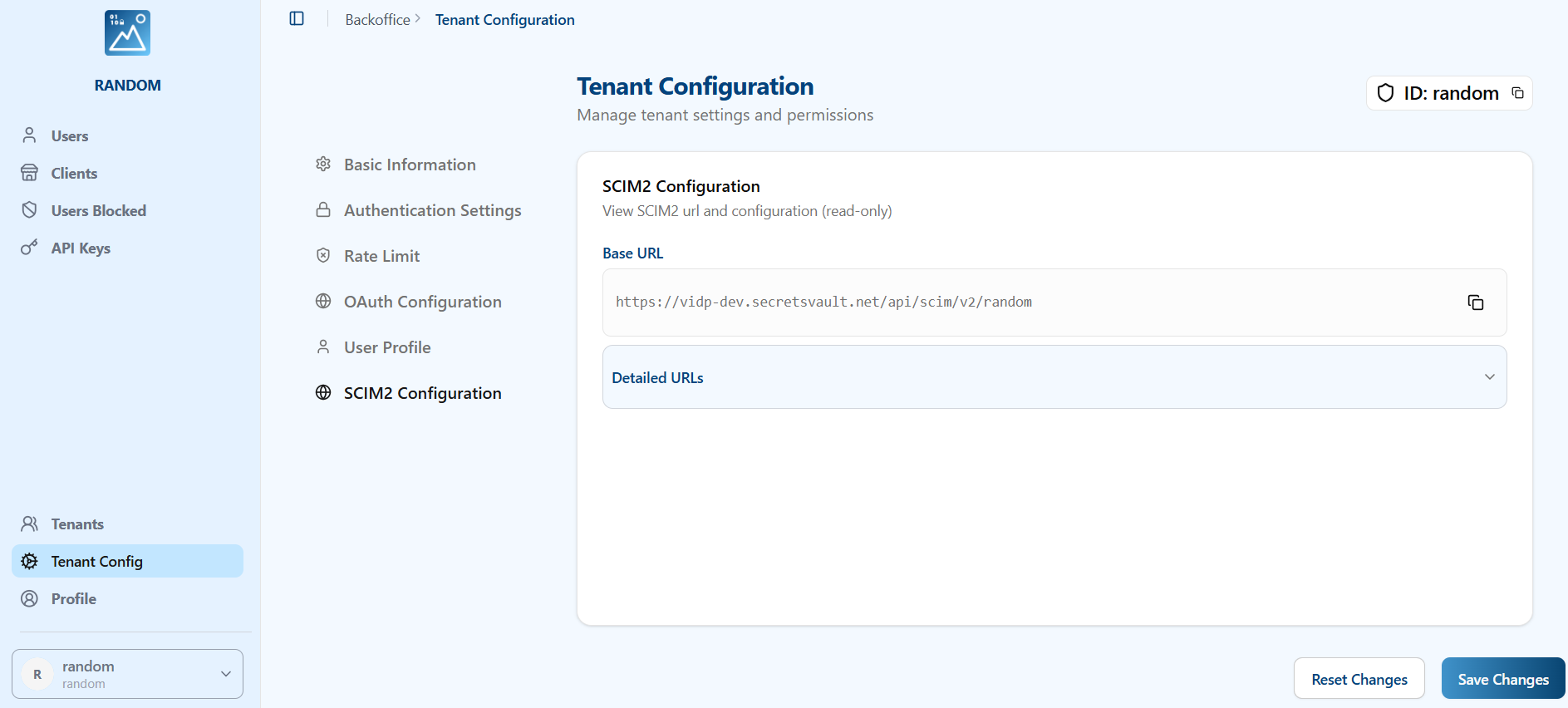
All SCIM 2.0 endpoints are prefixed with the following base URL:
https://<your-domain>/scim/v2/{tenant_id}
Replace {tenant_id} with your specific tenant ID. You can get the url from the SCIM2 config section in the tenant
Rate Limiting
The API enforces rate limiting to ensure stability.
- Limit: 200 requests per minute.
- If the limit is exceeded, the server will return a
429 Too Many Requestserror.
Supported Resources
1. Service Discovery
These endpoints allow clients to discover the SCIM specification features supported by the service.
- Get Service Provider Config:
GET /ServiceProviderConfig- Returns compliance details, authentication schemes, and supported data models.
- Bulk Operations: NOT supported.
- Sorting: NOT supported.
- ETags: NOT supported.
- Change Password: NOT supported.
- Get Resource Types:
GET /ResourceTypes- Lists available resource types (e.g., User, Group).
- Get Schemas:
GET /Schemas- Retrieves definitions of the resource schemas.
2. Users
Manage user identities.
Endpoint: /Users
Supported Operations
| Method | Endpoint | Description |
|---|---|---|
POST | /Users | Create a new user. |
GET | /Users/{id} | Retrieve a user by ID. |
GET | /Users | List users with pagination. |
PUT | /Users/{id} | Replace a user resource (Full update). |
PATCH | /Users/{id} | Update specific user attributes (Partial update). |
DELETE | /Users/{id} | Delete a user. |
Attribute Filtering
When retrieving a user by ID (GET /Users/{id}), you can specify which attributes to return or exclude using the standard SCIM query parameters:
attributes: A comma-separated list of attributes to include.excludedAttributes: A comma-separated list of attributes to exclude.
Example:
GET /Users/{id}?attributes=userName,emails
JSON Representation (Example)
{
	"schemas": [
		"urn:ietf:params:scim:schemas:core:2.0:User",
		"urn:ietf:params:scim:schemas:extension:enterprise:2.0:User"
	],
	"id": "user_ck...",
	"userName": "jdoe",
	"externalId": "12345",
	"active": true,
	"emails": [
		{
			"primary": true,
			"value": "jdoe@example.com",
			"type": "work"
		}
	],
	"urn:ietf:params:scim:schemas:extension:enterprise:2.0:User": {
		"employeeNumber": "12345",
		"department": "Engineering"
	},
	"meta": {
		"resourceType": "User",
		"created": "2023-10-27T10:00:00Z",
		"lastModified": "2023-10-27T10:00:00Z",
		"location": "..."
	}
}
3. Groups
Manage groups of users.
Endpoint: /Groups
Supported Operations
| Method | Endpoint | Description |
|---|---|---|
POST | /Groups | Create a new group. |
GET | /Groups/{id} | Retrieve a group by ID. |
GET | /Groups | List groups with pagination. |
PUT | /Groups/{id} | Replace a group resource. |
PATCH | /Groups/{id} | Update specific group attributes. |
DELETE | /Groups/{id} | Delete a group. |
JSON Representation (Example)
{
	"schemas": ["urn:ietf:params:scim:schemas:core:2.0:Group"],
	"id": "group_ck...",
	"displayName": "Engineering",
	"members": [
		{
			"value": "user_ck...",
			"display": "jdoe"
		}
	],
	"meta": {
		"resourceType": "Group",
		"location": "..."
	}
}
Pagination
List endpoints (GET /Users, GET /Groups) support pagination via the following query parameters:
startIndex: The 1-based index of the first result in the current set of list results (default: 1).count: The number of resources to return in a list response page (default: 100, max: 100).
Filtering
List endpoints (GET /Users, GET /Groups) support filtering resources using the filter query parameter as defined in RFC 7644 Section 3.4.2.2.
Supported Operators:
- Logical:
and,or,not,() - Comparison:
eq,ne,co,sw,ew,pr,gt,ge,lt,le
Example:
GET /Users?filter=userName eq "bjensen"
Filterable Attributes
Users
idexternal_iduserNameactivedisplayNamenickNametitleuserTypepreferredLanguagelocalename(familyName,givenName,middleName)emails(value,type,display,primary)phoneNumbers(value,type,display,primary)groups(value,type,display)roles(value,type,display,primary)
Groups
idexternal_iddisplayNamemembers(value,type,display)
Microsoft Entra ID (Azure AD) Compatibility
The SCIM 2.0 implementation has been fully tested with Microsoft Entra ID for both Users and Groups provisioning.
Supported User Schemas
Users support the SCIM core schema and the enterprise user extension.
Core User (urn:ietf:params:scim:schemas:core:2.0:User)
userNameactivedisplayNametitleemailspreferredLanguagenameaddressesphoneNumbersrolesuserTypenickNamelocaletimezone
Enterprise User (urn:ietf:params:scim:schemas:extension:enterprise:2.0:User)
employeeNumbercostCenterorganizationdivisiondepartment
Microsoft Entra ID provisioning uses the enterprise extension for additional user attributes, and removed users are soft-deleted by setting active=false rather than hard-deleted.
Known Limitations
- Bulk Operations: Provisioning must be configured to send individual requests as bulk is not supported.
- Sorting: Sorting of results is not supported.
- profileUrl: Microsoft Entra ID may send non-URL data in the
profileUrlfield during tests; this field should be handled with caution if relied upon.
Error Handling
Errors are returned in the standard SCIM error format.
Example Error Response:
{
	"schemas": ["urn:ietf:params:scim:api:messages:2.0:Error"],
	"status": "404",
	"detail": "User not found"
}
Common HTTP Status Codes:
200 OK: Successful retrieval or modification.201 Created: Resource successfully created.204 No Content: Successful deletion.400 Bad Request: Invalid input or request constraints (e.g., missing required fields).401 Unauthorized: Invalid or missing API key.403 Forbidden: API key lacks permissions or tenant access is denied.404 Not Found: Resource does not exist.409 Conflict: Resource already exists (e.g., duplicate username).429 Too Many Requests: Rate limit exceeded.500 Internal Server Error: Server-side processing error.